Document Overview
Document Overview This article is based on the official ETENWOLF Vortex S7 Series Air Compressor User Manual, version V2.1, filename S7_manual_EN_20251013.pdf, published on October 13, 2025. The manual is issued by ETENWOLF, a global inflation tools and lighting gear brand, and covers the complete setup,…
- Document type
- User Manual
- Prepared by
- Daniel Wright
- Published
- Last reviewed
- Topics
- User Manual
Document Overview
This article is based on the official ETENWOLF Vortex S7 Series Air Compressor User Manual, version V2.1, filename S7_manual_EN_20251013.pdf, published on October 13, 2025. The manual is issued by ETENWOLF, a global inflation tools and lighting gear brand, and covers the complete setup, operation, safety, and warranty information for the Vortex S7 Series portable air compressor. The document is written for end consumers and covers all functional modes, accessory usage, maintenance guidance, and troubleshooting procedures.
For support, users may contact ETENWOLF at (+1) 866-720-9226, Monday through Friday, 8AM–5PM PST, or via email at [email protected]. Extended warranty registration is available at https://etenwolf.com.
Product Information
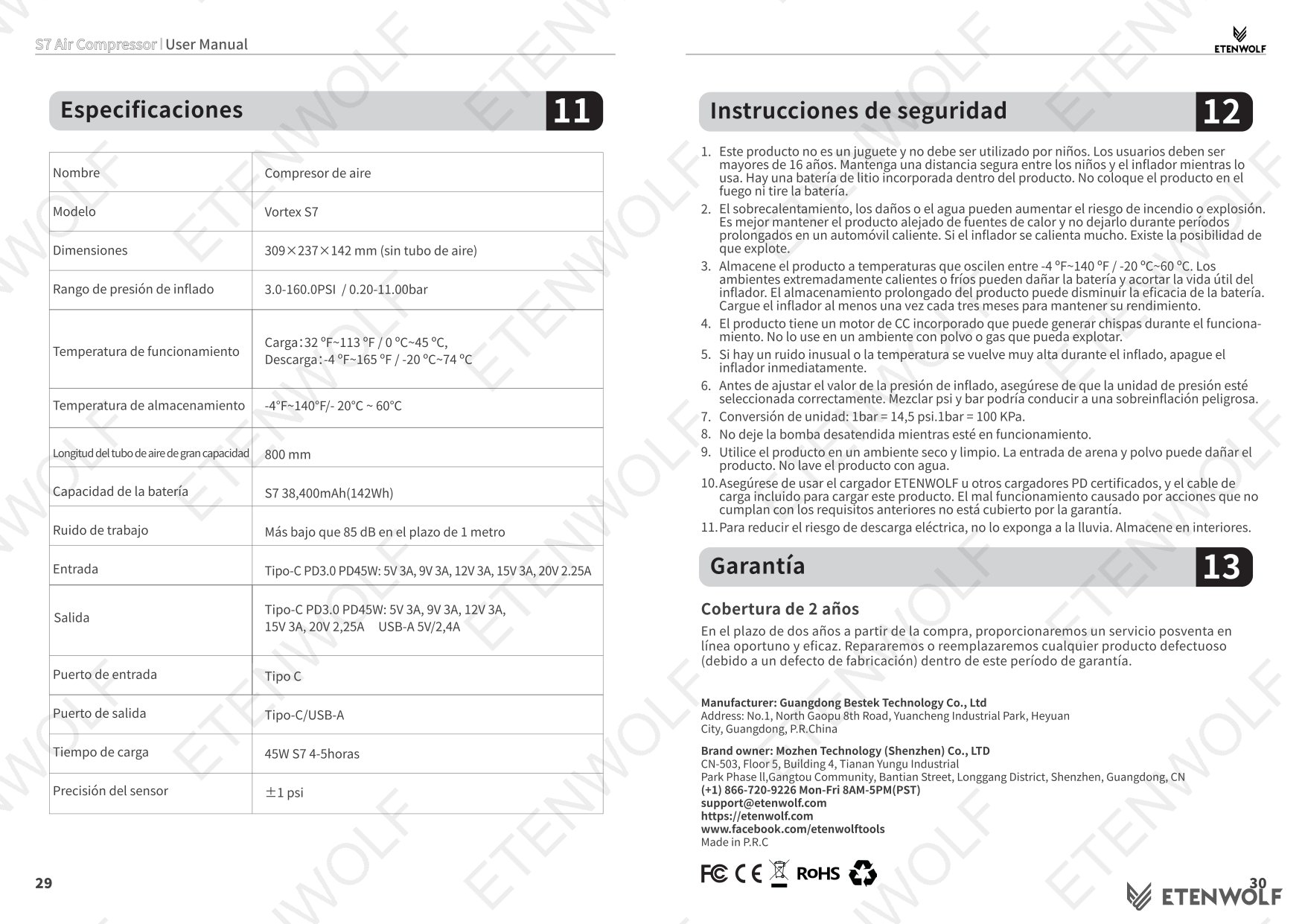
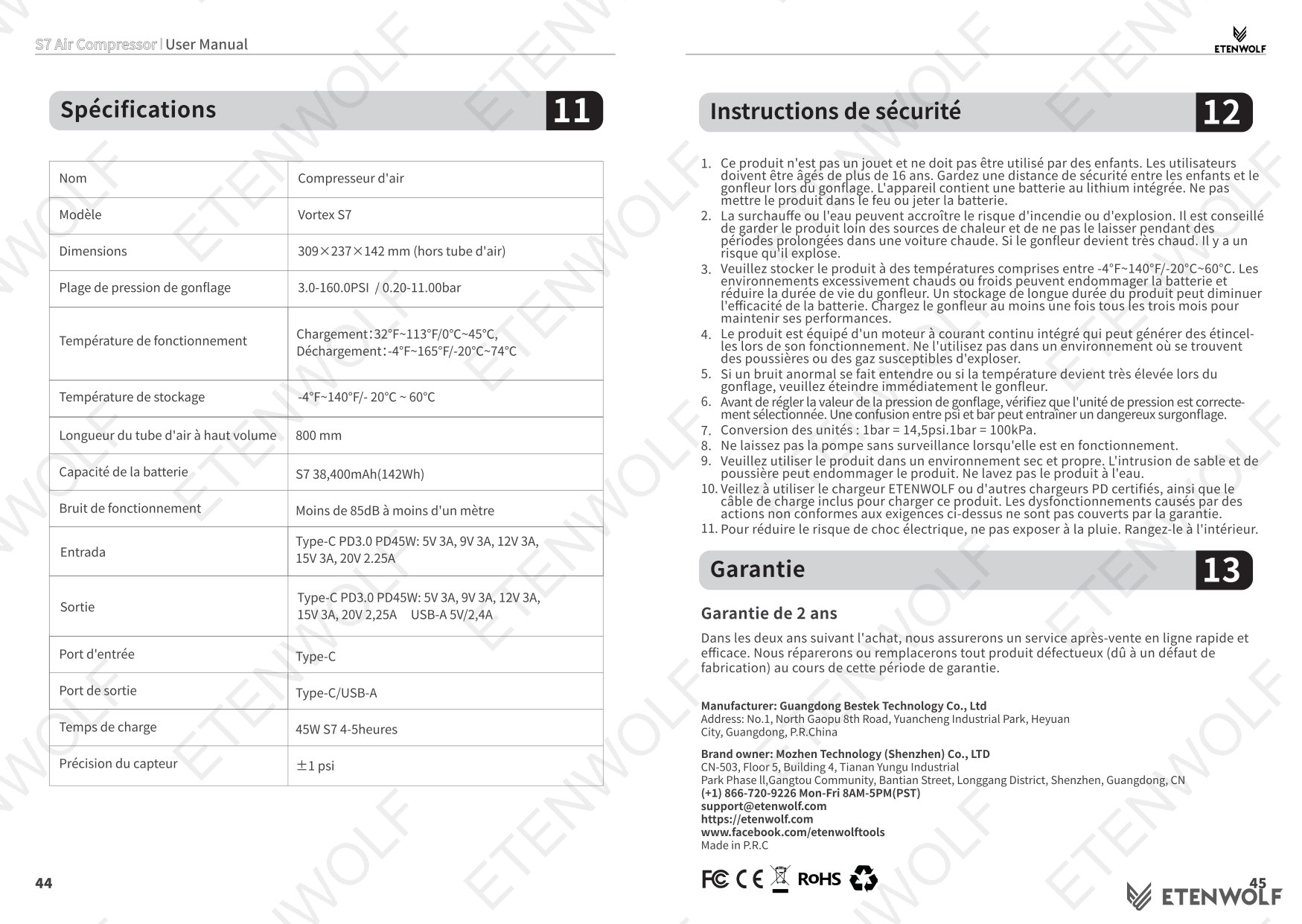
The ETENWOLF Vortex S7 is a compact, multi-purpose portable air compressor designed for inflating a wide variety of tires and inflatable items. It is built around a dual-hose system — a high-pressure hose for tires and precision inflatables, and a high-volume hose for items such as air mattresses and sporting goods. The unit integrates a built-in battery, LED work light, and power bank functionality, making it suitable for outdoor travel, roadside emergencies, and off-grid use.
| Attribute | Detail |
|---|---|
| Product Name | ETENWOLF Vortex S7 Series Air Compressor |
| Model | S7 |
| Manual Version | V2.1 |
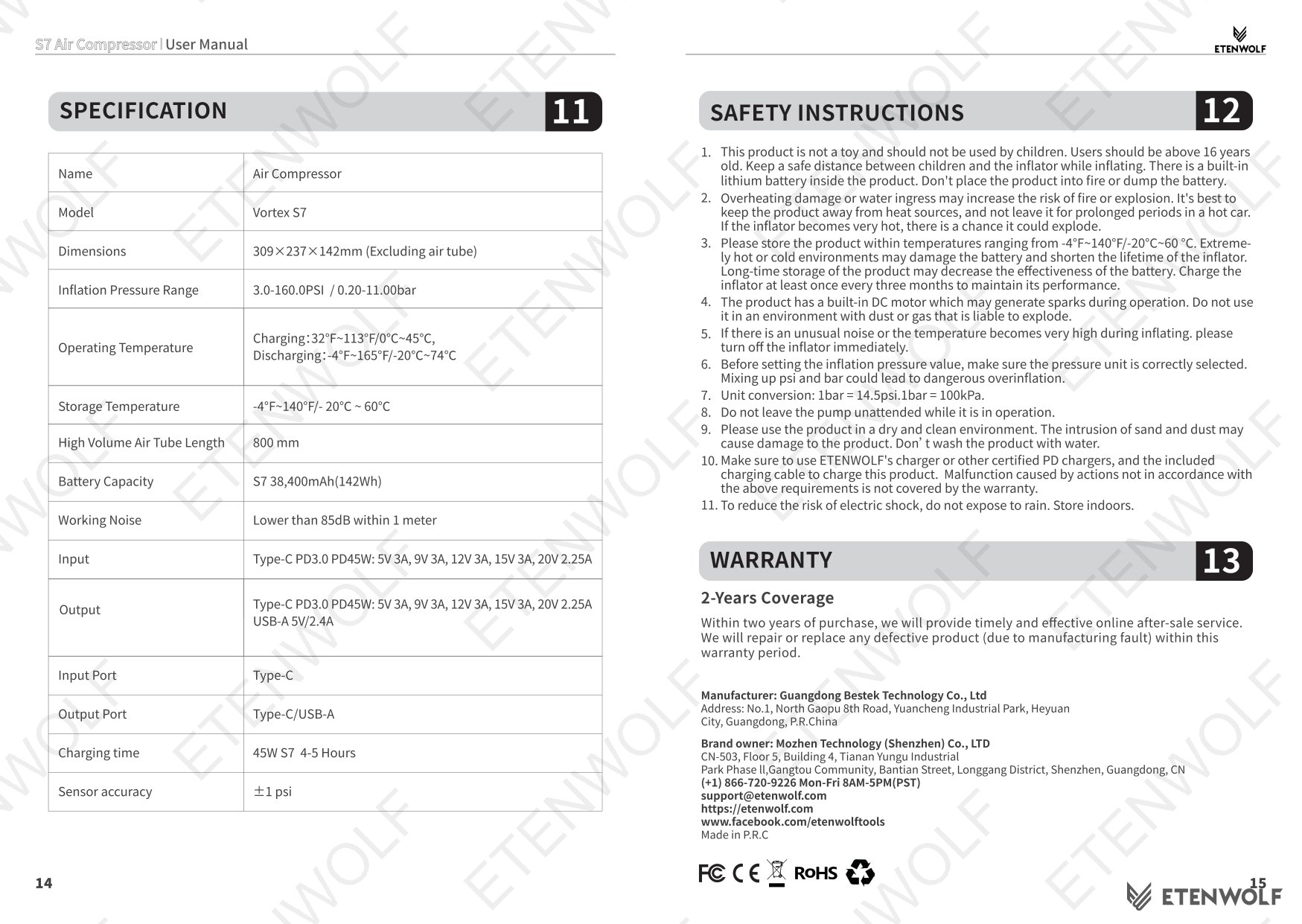
| Charger Included | 45W PD Charger |
| Charging Cable | USB-C to C Cable |
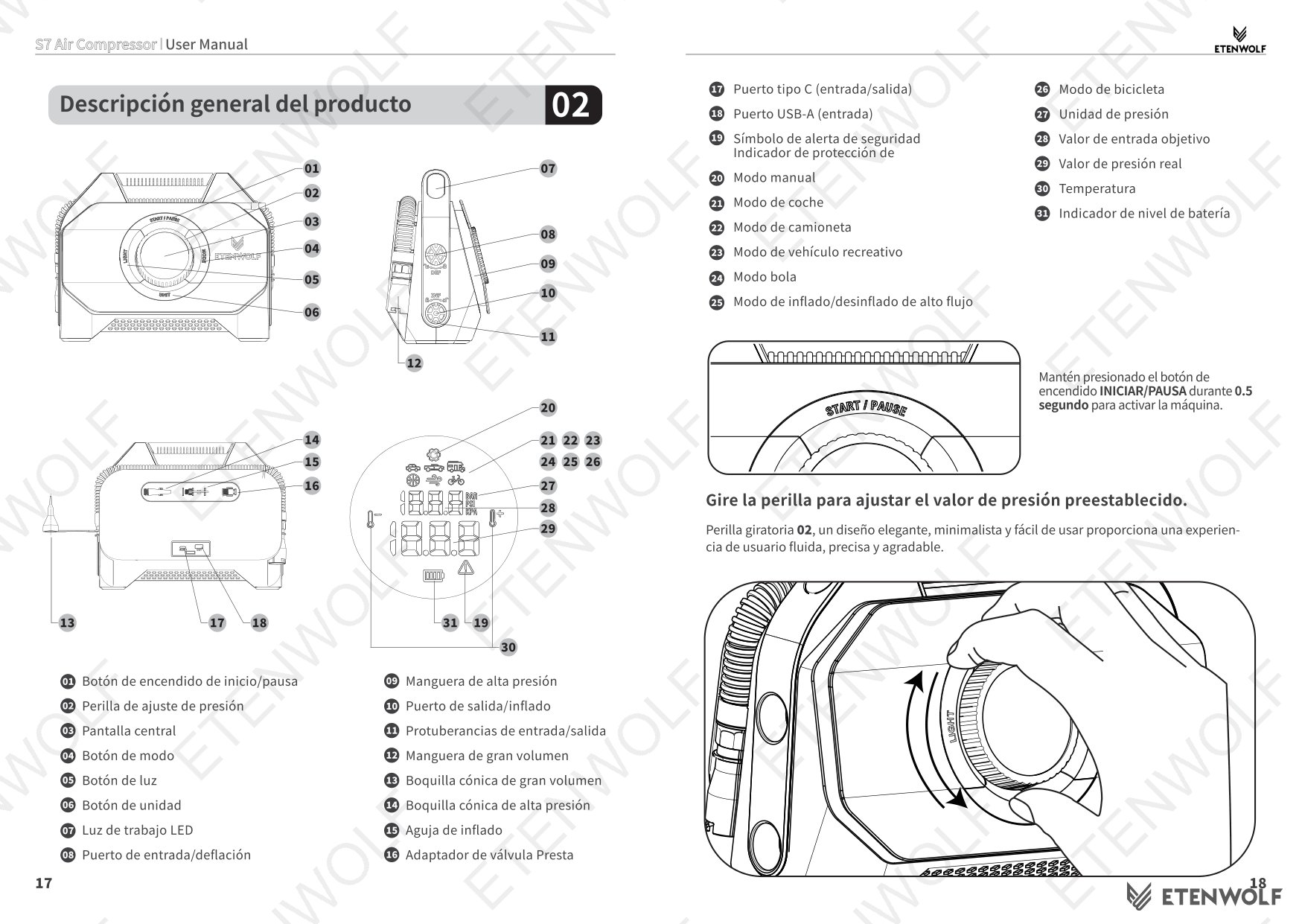
| Ports | Type-C (Input/Output), USB-A (Input) |
| Pressure Units Supported | PSI, kPa, Bar |
| Max Pressure (Manual Mode) | 160.0 psi |
| Inflation Modes | 7 (Car, Pickup Truck, Recreational Vehicle, Bicycle, Ball, Manual, High-Flow Deflation) |
| LED Light Modes | 4 (Bright, Ultra-Bright, Slow Strobe, SOS) |
Key Details
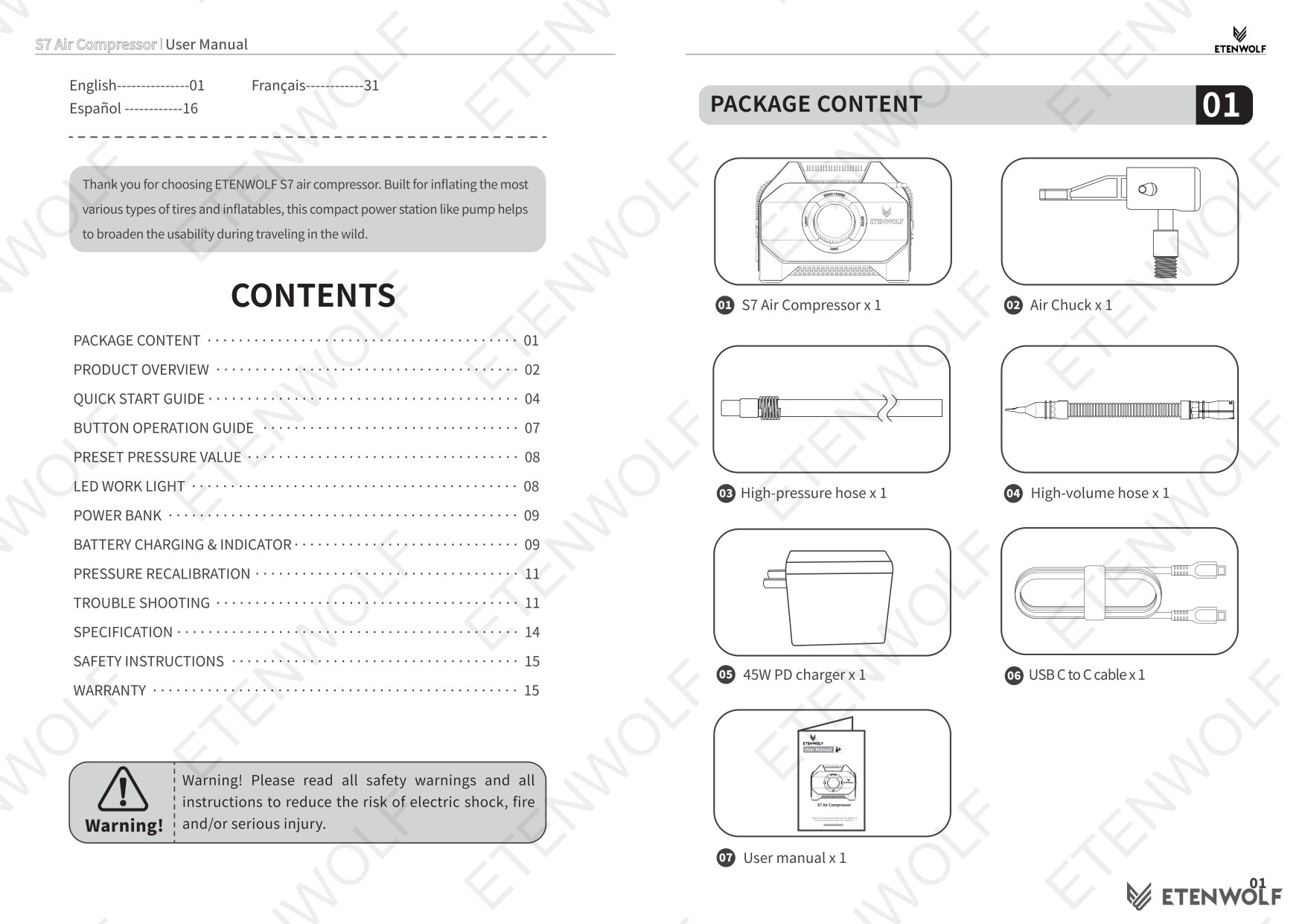
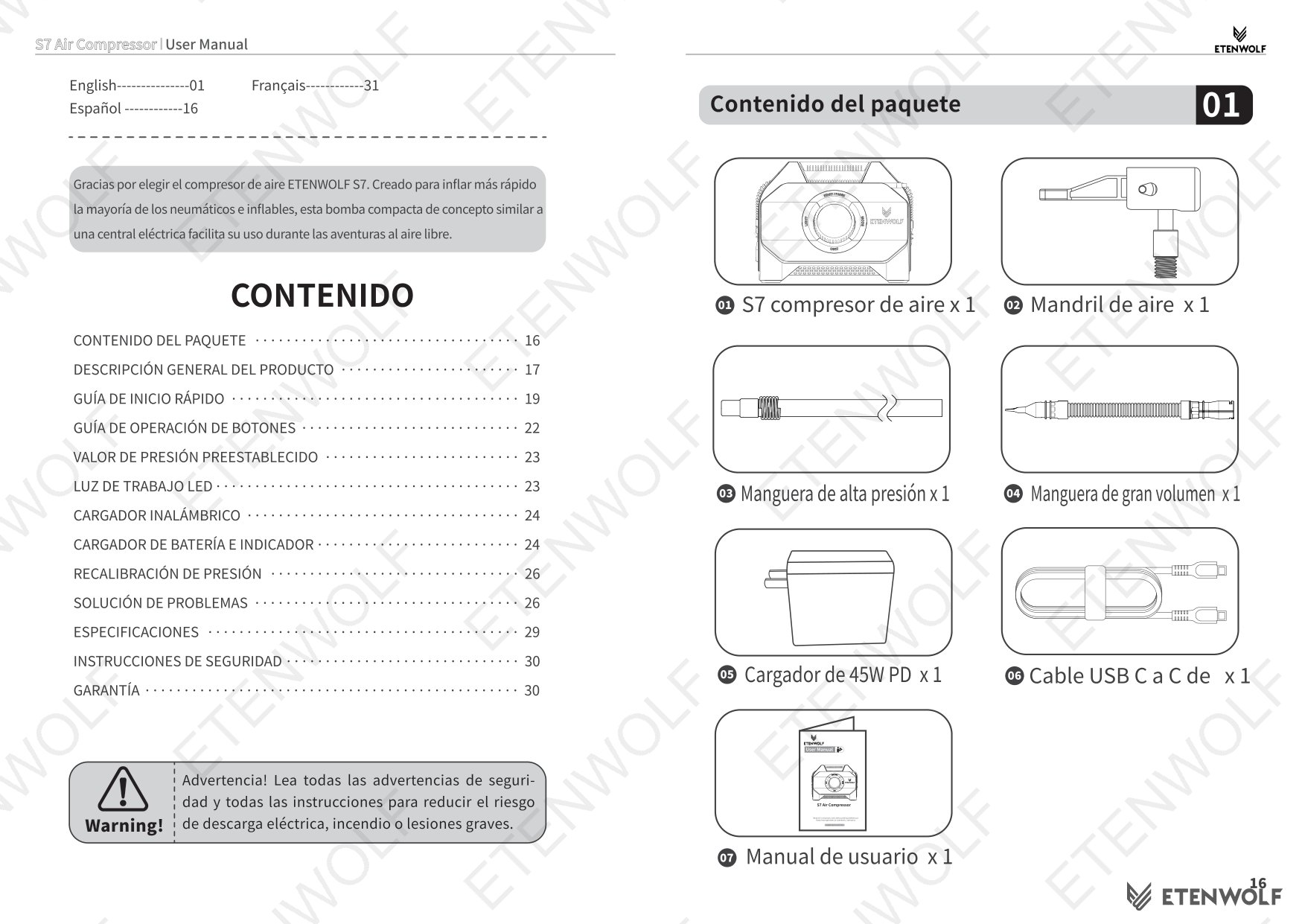
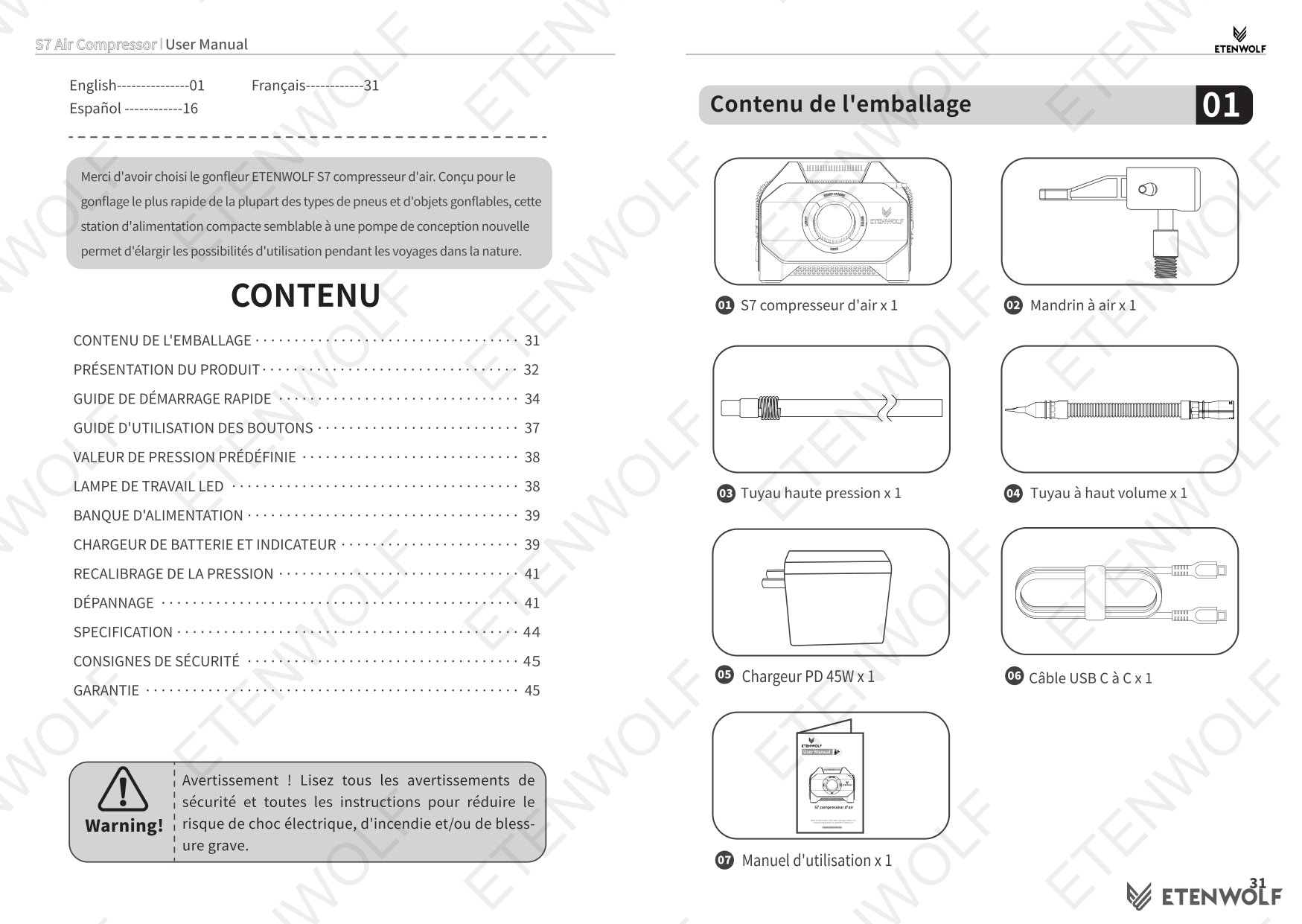
Package Contents
- S7 Air Compressor x 1
- High-pressure hose x 1
- High-volume hose x 1
- Air Chuck x 1
- 45W PD Charger x 1
- USB-C to C Cable x 1
- User Manual x 1
Inflation Mode Pressure Ranges
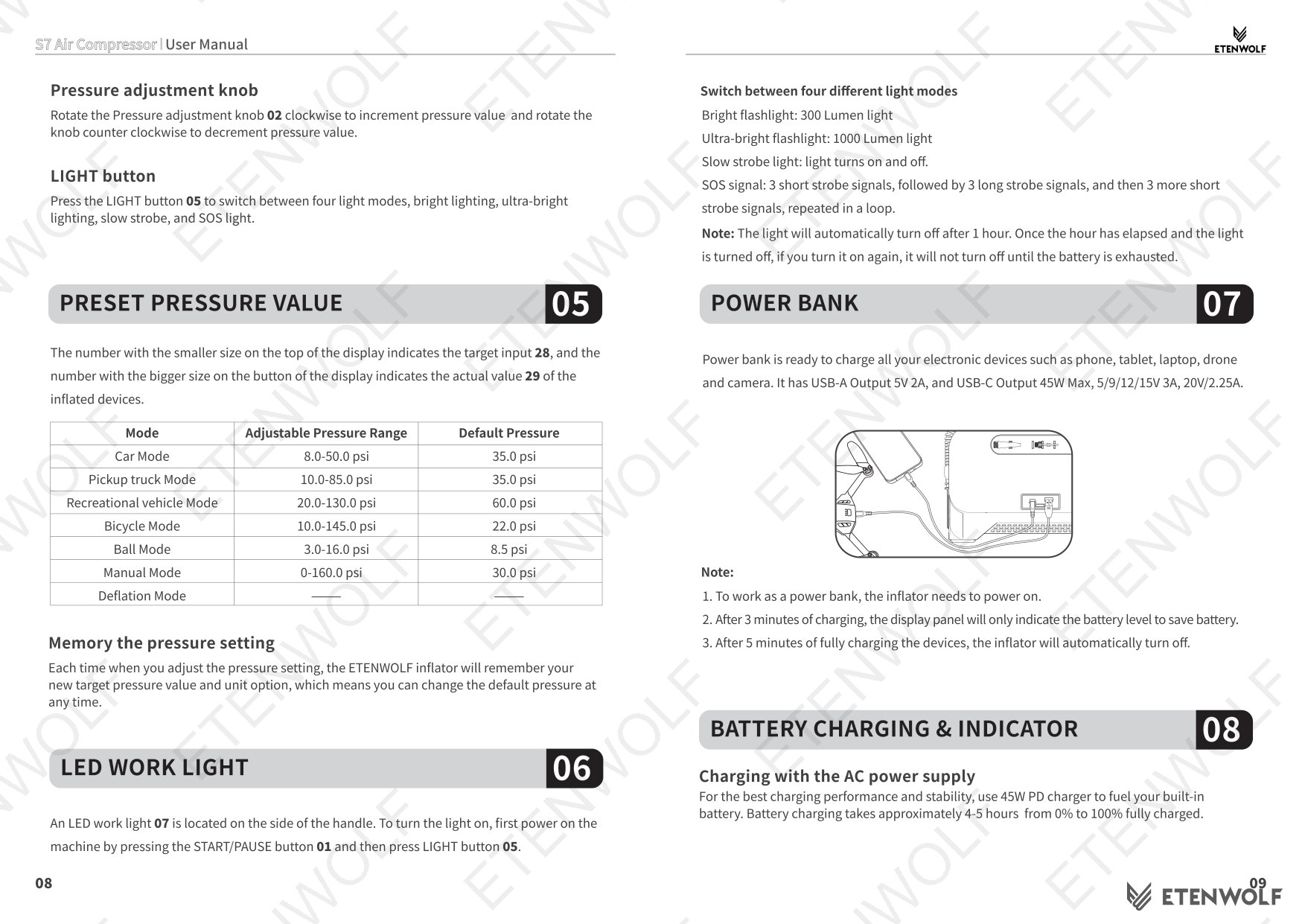
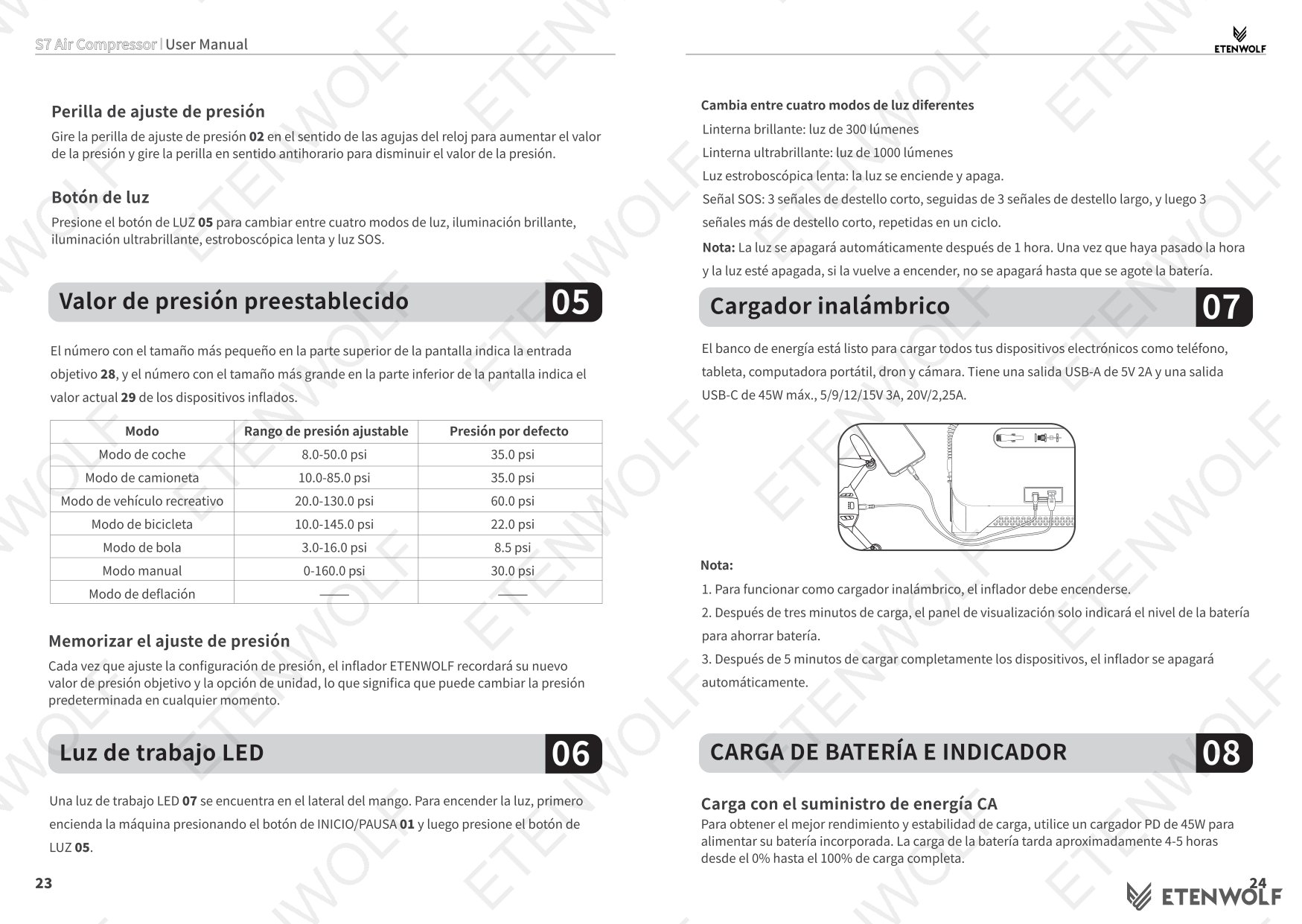
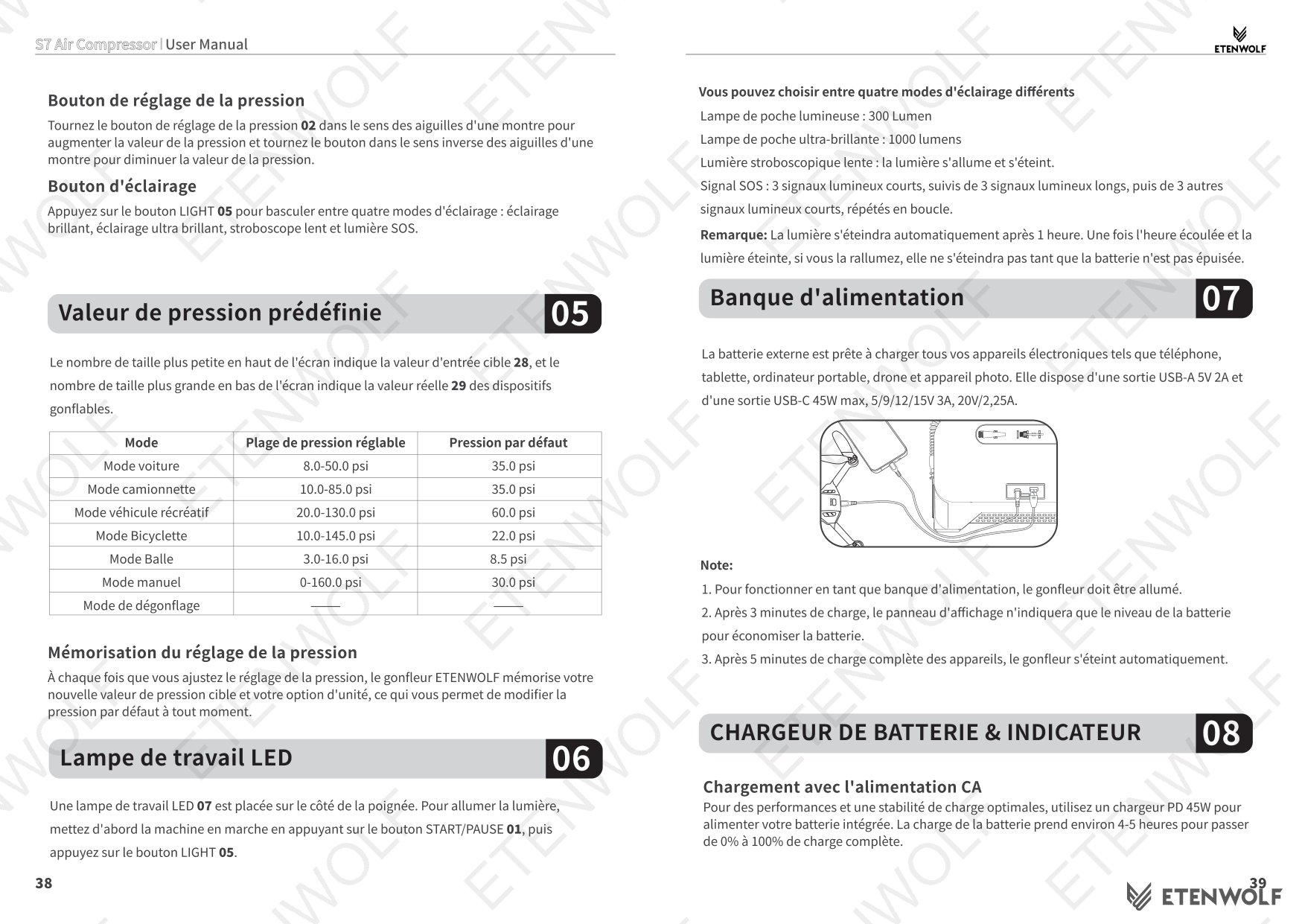
| Mode | Adjustable Pressure Range | Default Pressure |
|---|---|---|
| Car Mode | 8.0 – 50.0 psi | 35.0 psi |
| Pickup Truck Mode | 10.0 – 85.0 psi | 35.0 psi |
| Recreational Vehicle Mode | 20.0 – 130.0 psi | 60.0 psi |
| Bicycle Mode | 10.0 – 145.0 psi | 22.0 psi |
| Ball Mode | 3.0 – 16.0 psi | 8.5 psi |
| Manual Mode | 0 – 160.0 psi | 30.0 psi |
| High-Flow Deflation Mode | N/A | N/A |
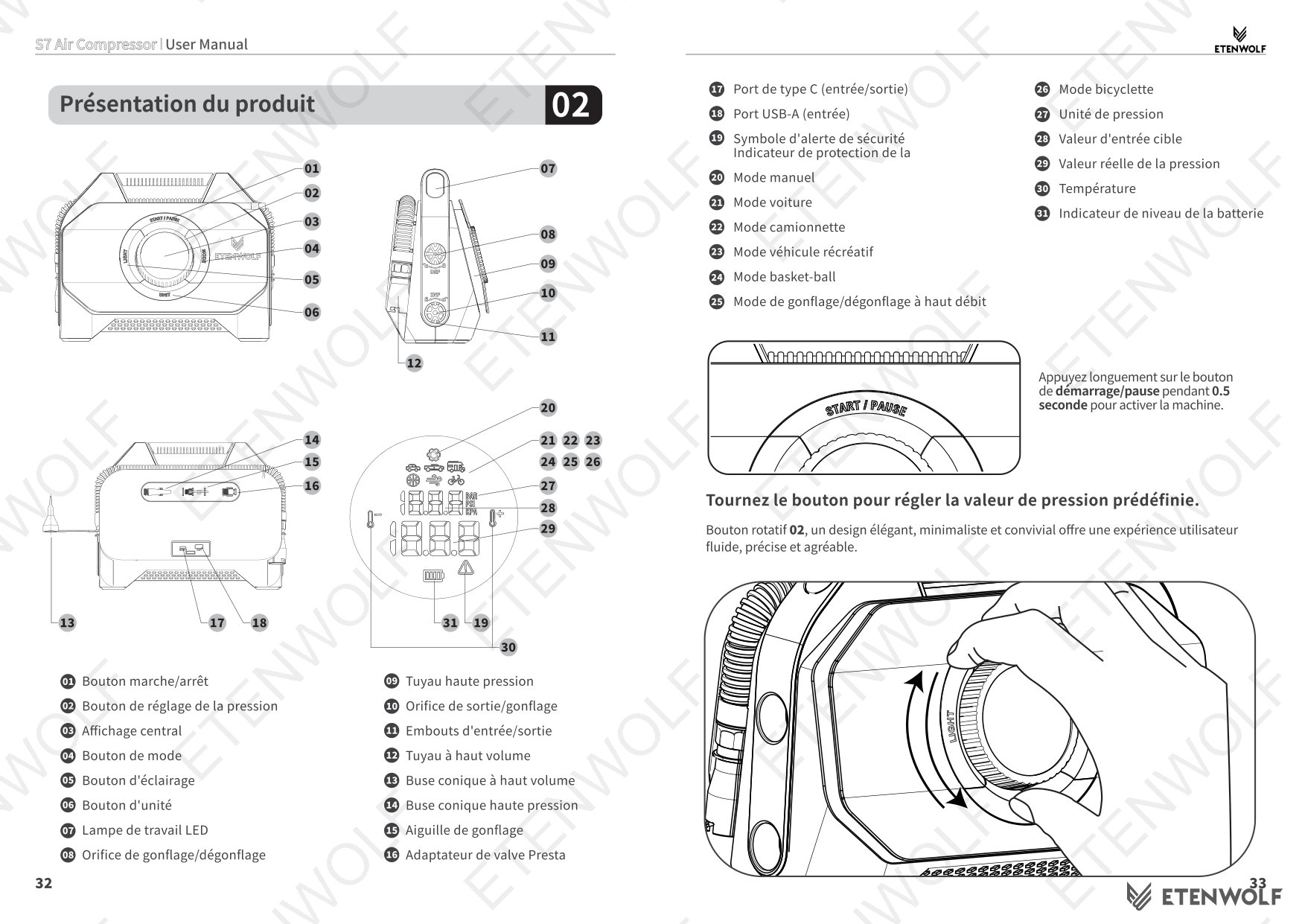
Button Operation Summary
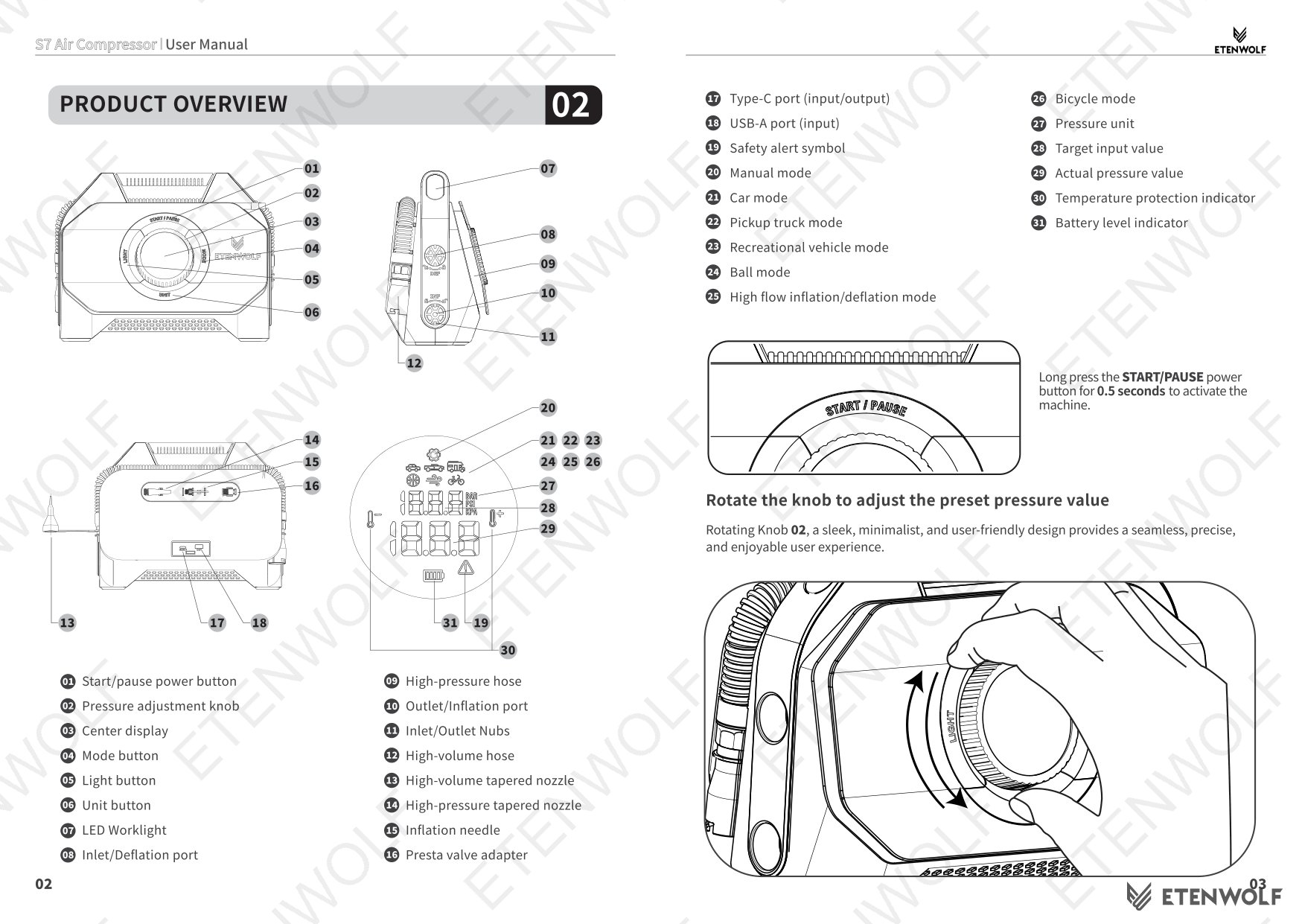
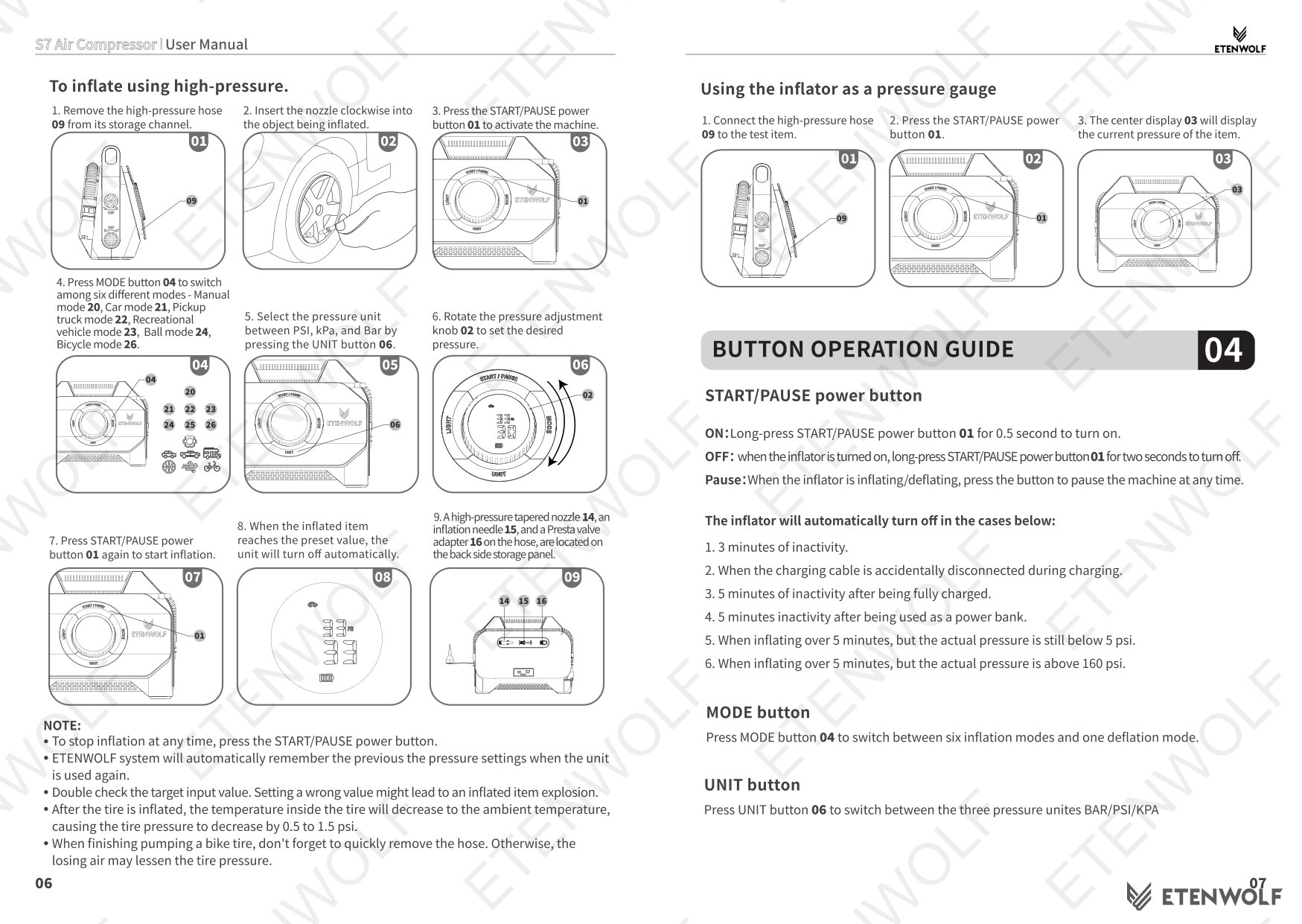
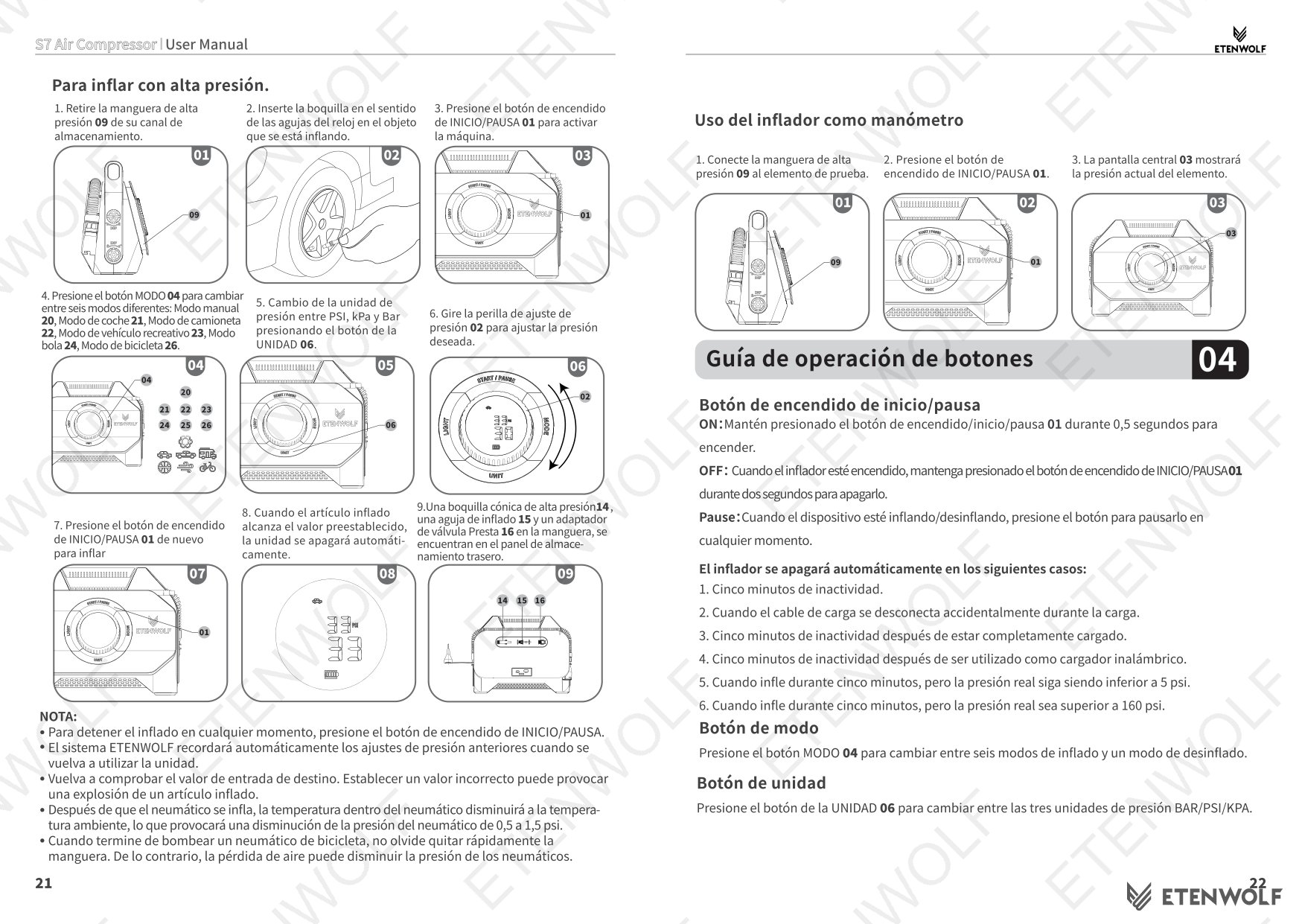
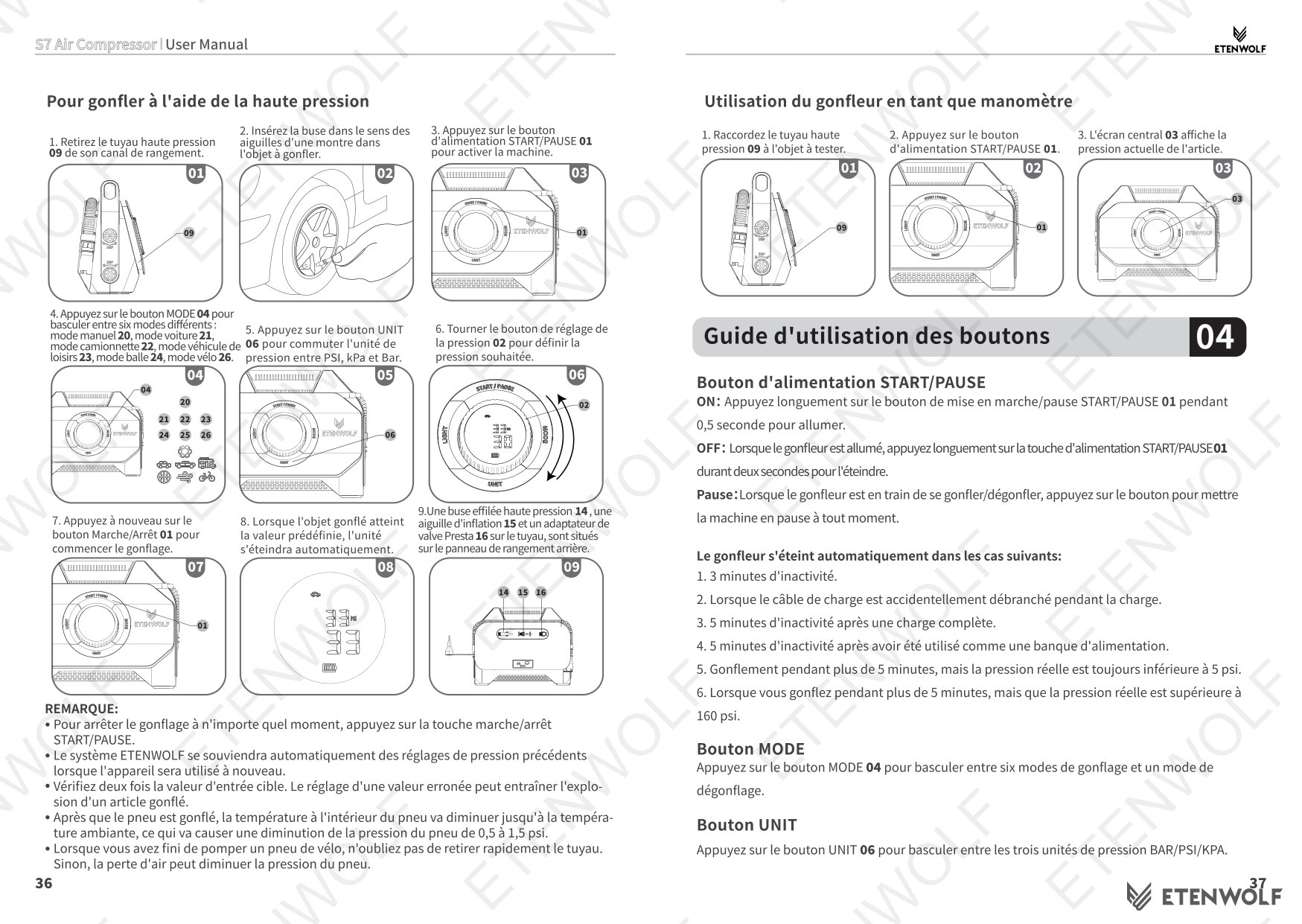
- START/PAUSE Power Button: Long-press 0.5 seconds to power on; long-press 2 seconds to power off; single press to pause inflation or deflation at any time.
- MODE Button: Cycles through 6 inflation modes and 1 deflation mode.
- UNIT Button: Switches between BAR, PSI, and kPa.
- Pressure Adjustment Knob: Rotate clockwise to increase target pressure; counter-clockwise to decrease.
- LIGHT Button: Cycles through Bright, Ultra-Bright, Slow Strobe, and SOS light modes.
Automatic Shut-Off Conditions
- 3 minutes of inactivity.
- Charging cable accidentally disconnected during charging.
- 5 minutes of inactivity after being fully charged.
- 5 minutes of inactivity after being used as a power bank.
- Inflating over 5 minutes but actual pressure remains below 5 psi.
- Inflating over 5 minutes but actual pressure is above 160 psi.
How to Inflate Using High-Pressure Hose
- Remove the high-pressure hose from its storage channel.
- Insert the nozzle clockwise into the valve of the item being inflated.
- Long-press the START/PAUSE button to power on the unit.
- Press the MODE button to select the appropriate inflation mode.
- Press the UNIT button to select PSI, kPa, or Bar.
- Rotate the pressure adjustment knob to set the desired target pressure.
- Press START/PAUSE again to begin inflation. The unit will shut off automatically when the preset pressure is reached.
- Accessories (tapered nozzle, inflation needle, Presta valve adapter) are stored on the back-side storage panel.
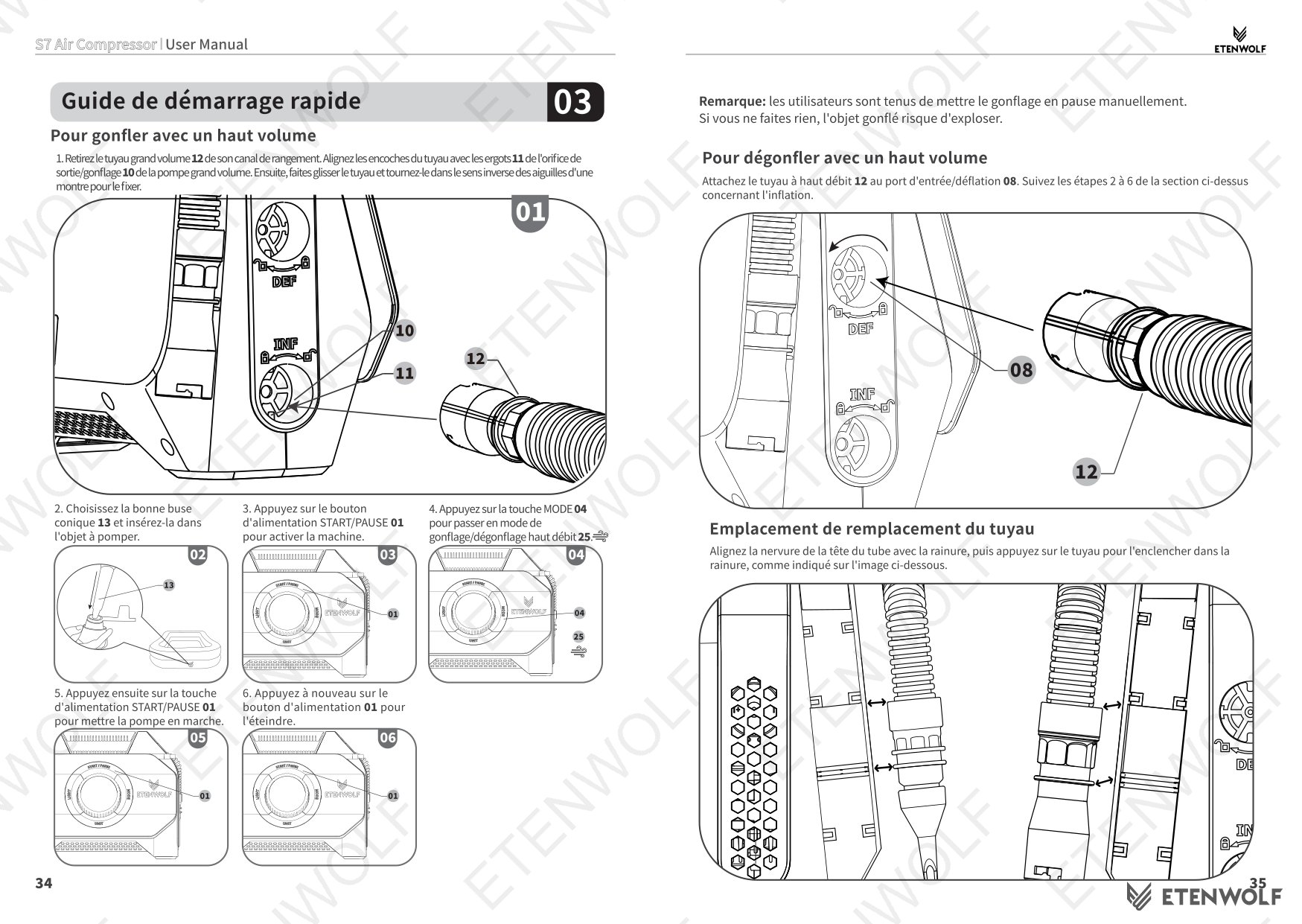
How to Inflate Using High-Volume Hose
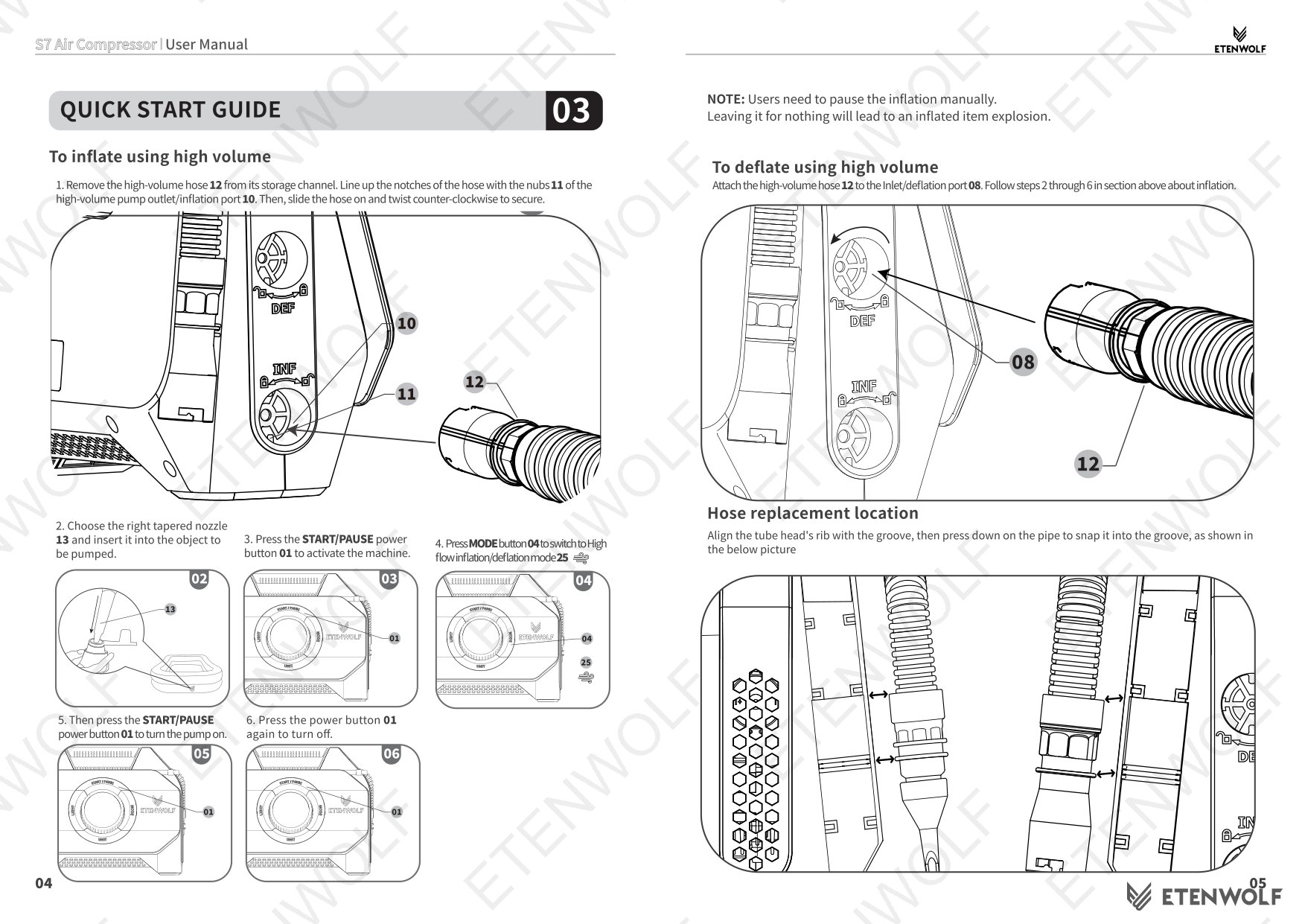
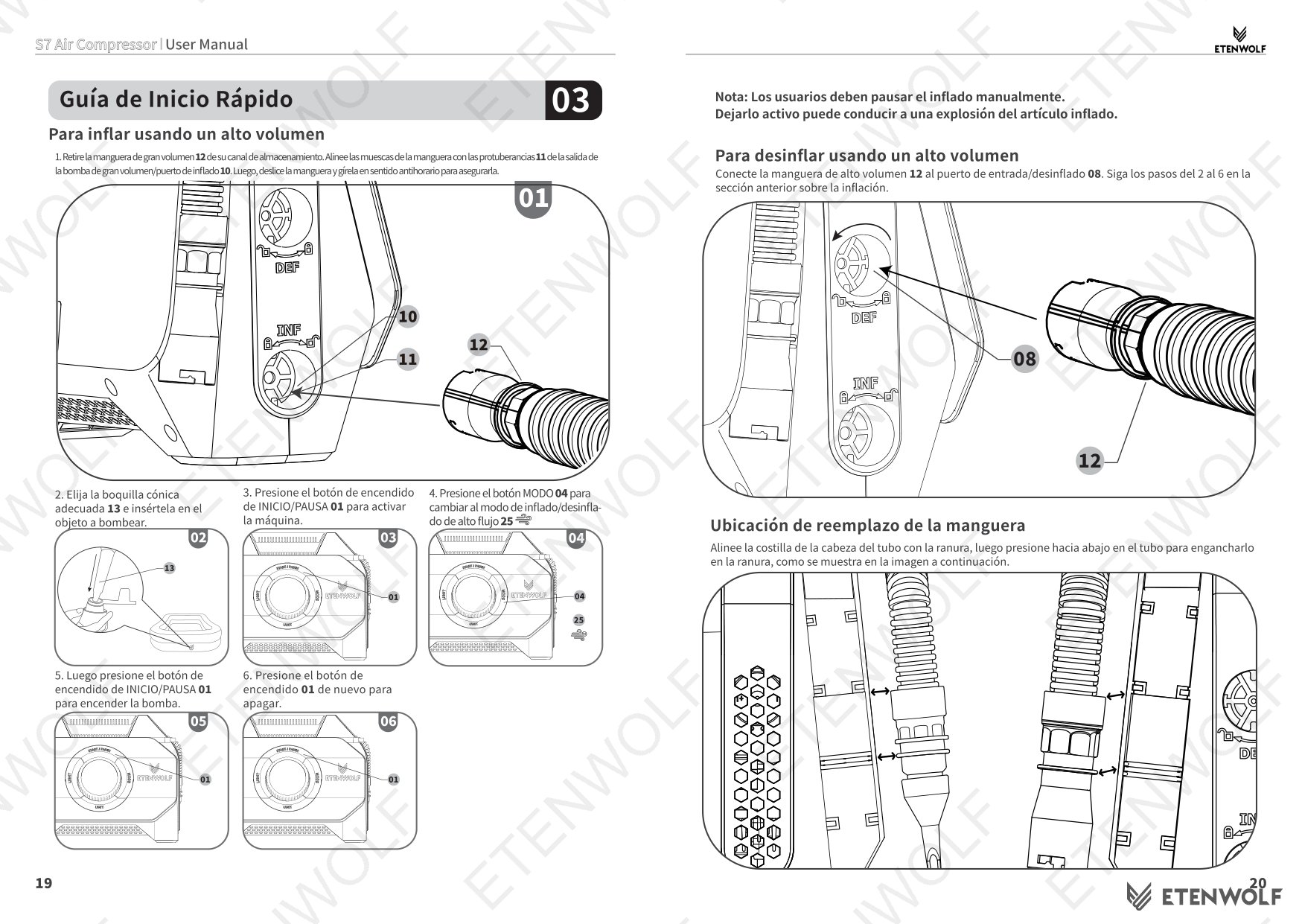
- Remove the high-volume hose from its storage channel. Align the notches with the nubs on the outlet/inflation port, slide on, and twist counter-clockwise to secure.
- Choose the appropriate tapered nozzle and insert it into the object to be inflated.
- Power on the unit and press the MODE button to select High-Flow Inflation/Deflation mode.
- Press START/PAUSE to begin. Monitor inflation manually — the unit does not auto-stop in high-volume mode. Over-inflation can cause item explosion.
- Press the power button again to stop.
Using the S7 as a Pressure Gauge
Connect the high-pressure hose to the test item and press the START/PAUSE button. The center display will show the current pressure of the item without activating the pump.
Standards & Compliance
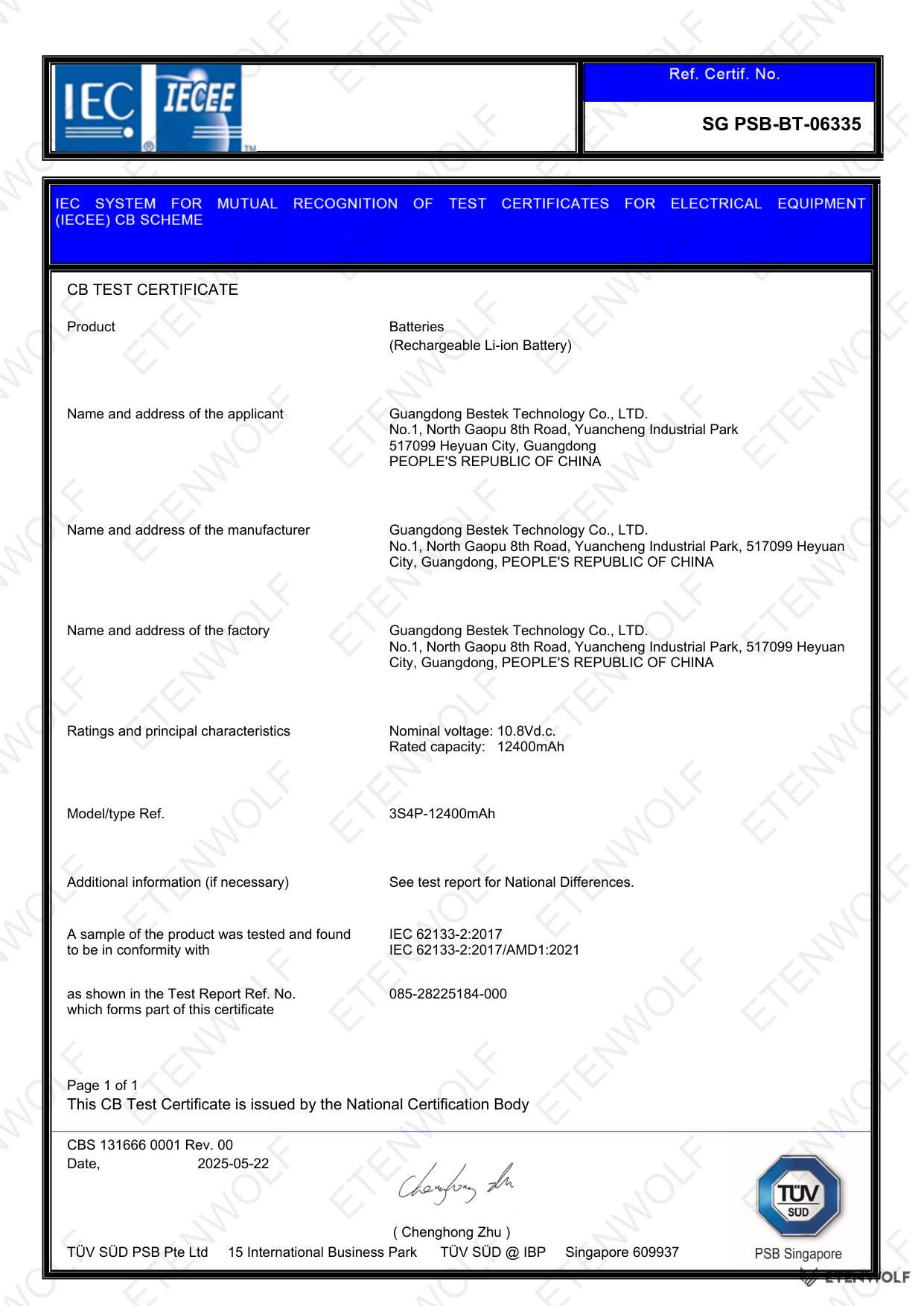
The Vortex S7 User Manual (V2.1) is a product documentation file and does not itself carry a certification number or reference specific third-party test standards. However, the following compliance and design characteristics are reflected in the product design and operational guidelines described in the manual:
- USB Power Delivery (PD) Compliance: The unit ships with a 45W PD charger and uses a USB-C port for both input and output, consistent with USB PD charging standards.
- Pressure Safety Limits: The maximum operational pressure of 160 psi in Manual Mode and the automatic shut-off thresholds are designed in accordance with general portable compressor safety practices.
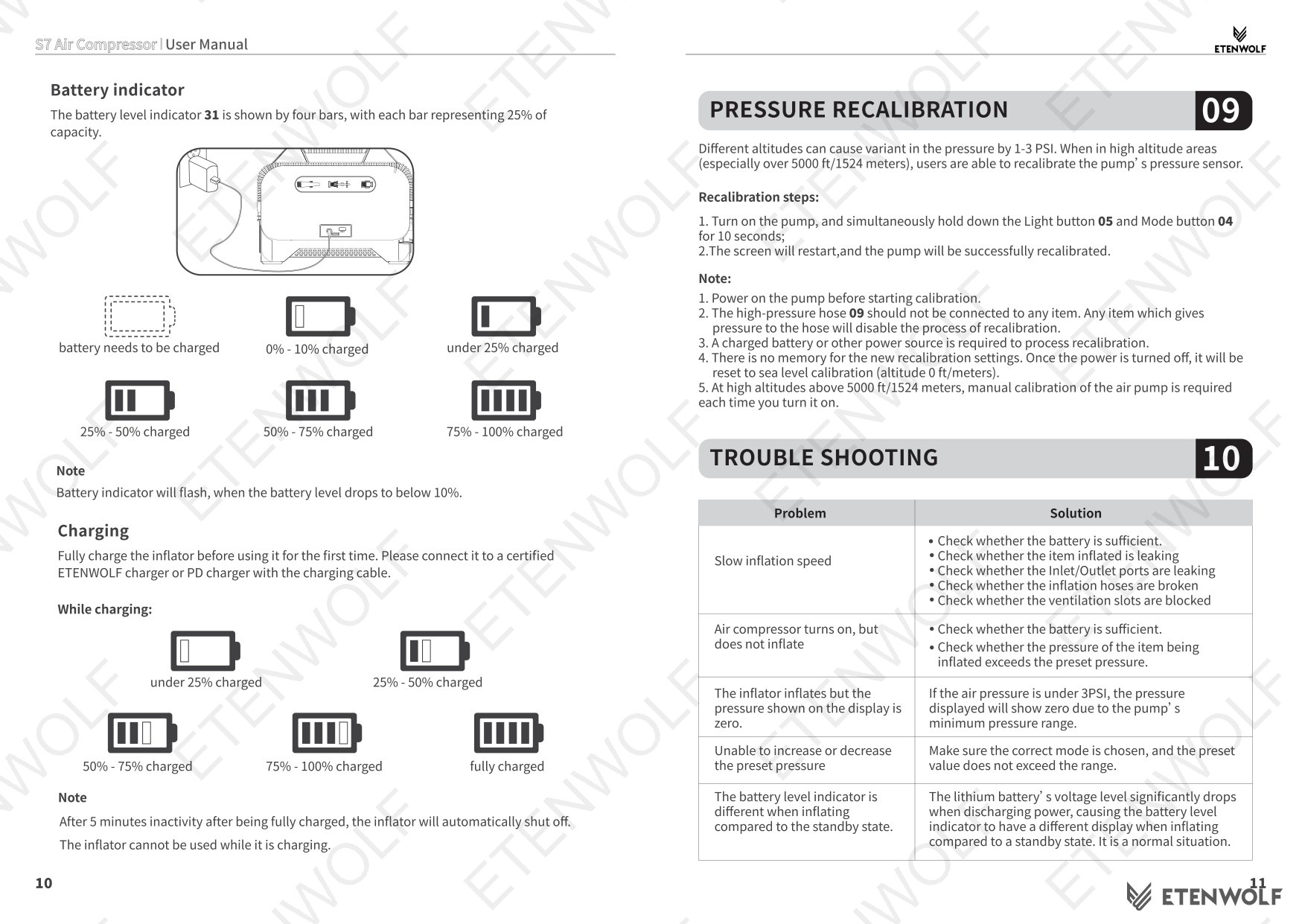
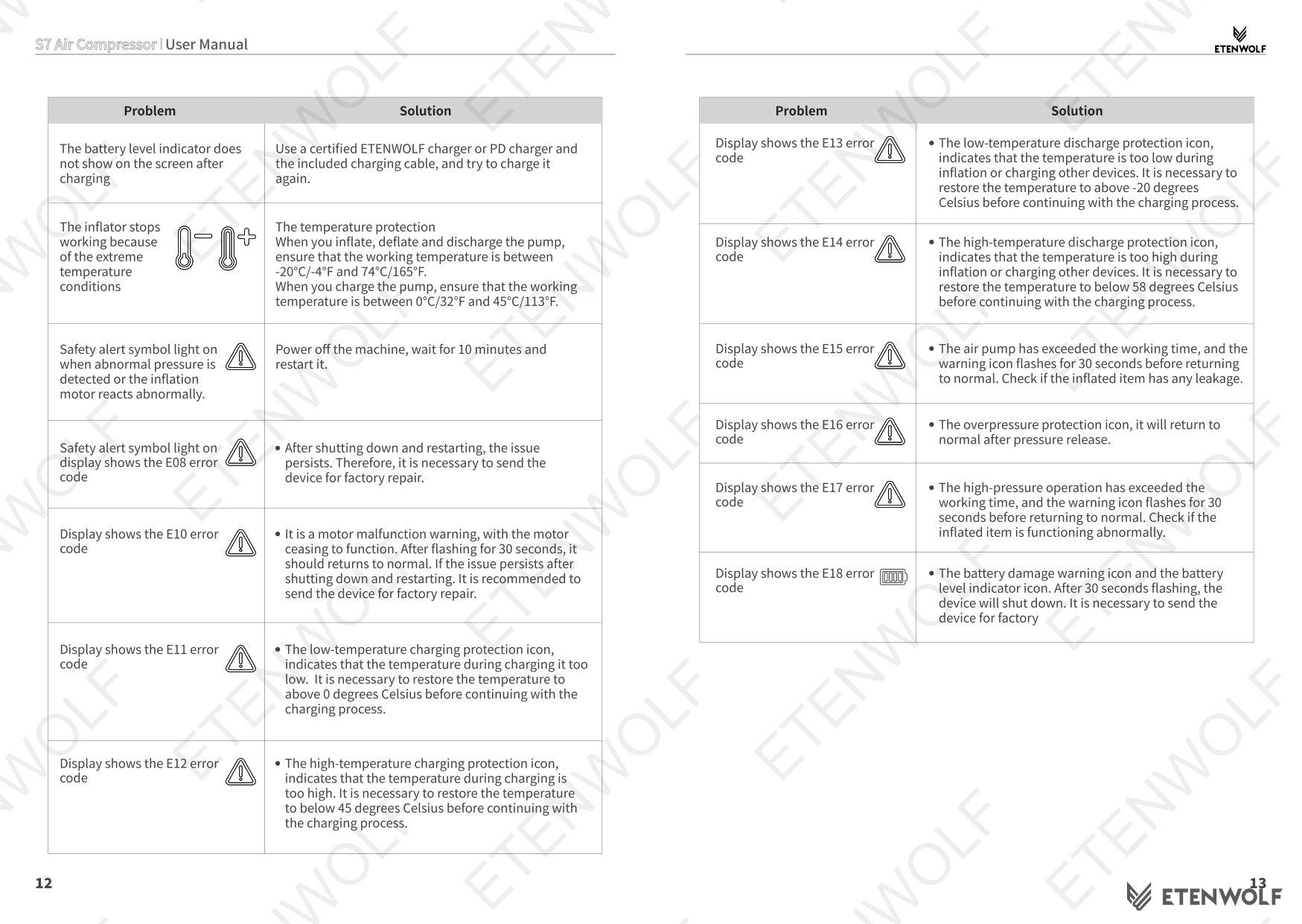
- Temperature Protection: A temperature protection indicator is built into the display, signaling thermal overload conditions to prevent damage.
- Safety Alert Symbols: The product and manual incorporate a safety alert symbol on the unit itself, consistent with ANSI Z535 safety labeling conventions for consumer power tools.
- LED Safety Modes: The inclusion of a dedicated SOS strobe light mode meets practical emergency signaling use cases for roadside and outdoor scenarios.
For specific regulatory certifications (such as FCC, CE, RoHS, or UN38.3 for the battery), refer to the product compliance documentation available through ETENWOLF customer support or the product listing page at https://etenwolfgroup.com.
Validity & Certification Body
This user manual applies to the ETENWOLF Vortex S7 Series Air Compressor as of its release date of October 13, 2025 (document version V2.1). It remains valid for all S7 units shipped with or after this manual version. ETENWOLF reserves the right to update the manual as the product evolves; users are encouraged to check the ETENWOLF website for the latest revision.
Issuing Organization: ETENWOLF
Support Contact: (+1) 866-720-9226 | [email protected] | Mon–Fri 8AM–5PM PST
Warranty Registration: https://etenwolf.com — registering at this URL entitles the user to a 1-year extended warranty beyond the standard coverage.
Official Product Page: https://etenwolfgroup.com
This document is not a third-party test report or certification. For laboratory test reports and regulatory approvals associated with this product, contact ETENWOLF support directly.
Frequently Asked Questions
- Q: Does the ETENWOLF S7 automatically stop inflating when the target pressure is reached?
- A: Yes, when using the high-pressure hose in any of the six tire or pressure-based modes (Car, Pickup Truck, Recreational Vehicle, Bicycle, Ball, or Manual), the S7 will automatically shut off once the tire or inflatable reaches the preset target pressure. However, in High-Flow Inflation/Deflation mode (used with the high-volume hose), there is no automatic shut-off — the user must manually stop inflation to avoid over-inflating and potentially bursting the item.
- Q: How do I use the S7 as a power bank to charge other devices?
- A: The S7 includes a Type-C port that supports both input and output, meaning you can use it to charge phones and other USB-C devices. Power the unit on using the START/PAUSE button, then connect your device to the Type-C port. The unit will automatically power off after 5 minutes of inactivity in power bank mode to conserve battery.
- Q: Why does my tire pressure read lower after I finish inflating?
- A: This is normal. When you inflate a tire, the air inside heats up due to compression. Once the compressor stops and the tire cools down to ambient temperature, the pressure will naturally drop by approximately 0.5 to 1.5 psi. ETENWOLF recommends accounting for this by slightly over-inflating to your target, or re-checking the pressure once the tire has cooled.
- Q: How do I switch between PSI, kPa, and Bar on the S7?
- A: Press the UNIT button (button 06 on the unit) to cycle between the three supported pressure units: PSI, kPa, and Bar. The S7 will remember your last selected unit and pressure setting the next time you power it on, so you do not need to reconfigure it each use.
Related Documents
The following document types are relevant to the ETENWOLF Vortex S7 Air Compressor and may be of interest to buyers, importers, retailers, or compliance teams:
- FCC Declaration of Conformity — Required for sale in the United States; covers electromagnetic compatibility (EMC) of the device and its charging circuitry.
- CE Declaration of Conformity — Required for sale in the European Union; covers Low Voltage Directive (LVD) and EMC Directive compliance.
- UN 38.3 Battery Test Report — Certifies that the built-in lithium battery meets international transport safety requirements for air and ground shipping.
- RoHS Compliance Certificate — Confirms the product does not contain restricted hazardous substances above permitted thresholds, required for EU market access.
- MSDS / Safety Data Sheet — Material Safety Data Sheet for the lithium battery cell used in the S7, relevant for logistics, warehousing, and import documentation.
- Quick Start Guide (QSG) — A condensed version of setup and operation instructions, typically included in the retail packaging alongside this full user manual.
- Warranty Certificate — Outlines the standard warranty terms and the process for claiming the 1-year extended warranty via registration at https://etenwolf.com.
Document Pages