Document Overview
Document Overview This article is based on the official product user manual for the ETENWOLF T500 tire inflator gauge, issued by ETENWOLF — a global inflation tools and lighting gear brand. The manual covers the complete operating procedure for checking tire pressure, inflating, and deflating…
- Document type
- User Manual
- Prepared by
- Daniel Wright
- Published
- Last reviewed
- Topics
- User Manual
Document Overview
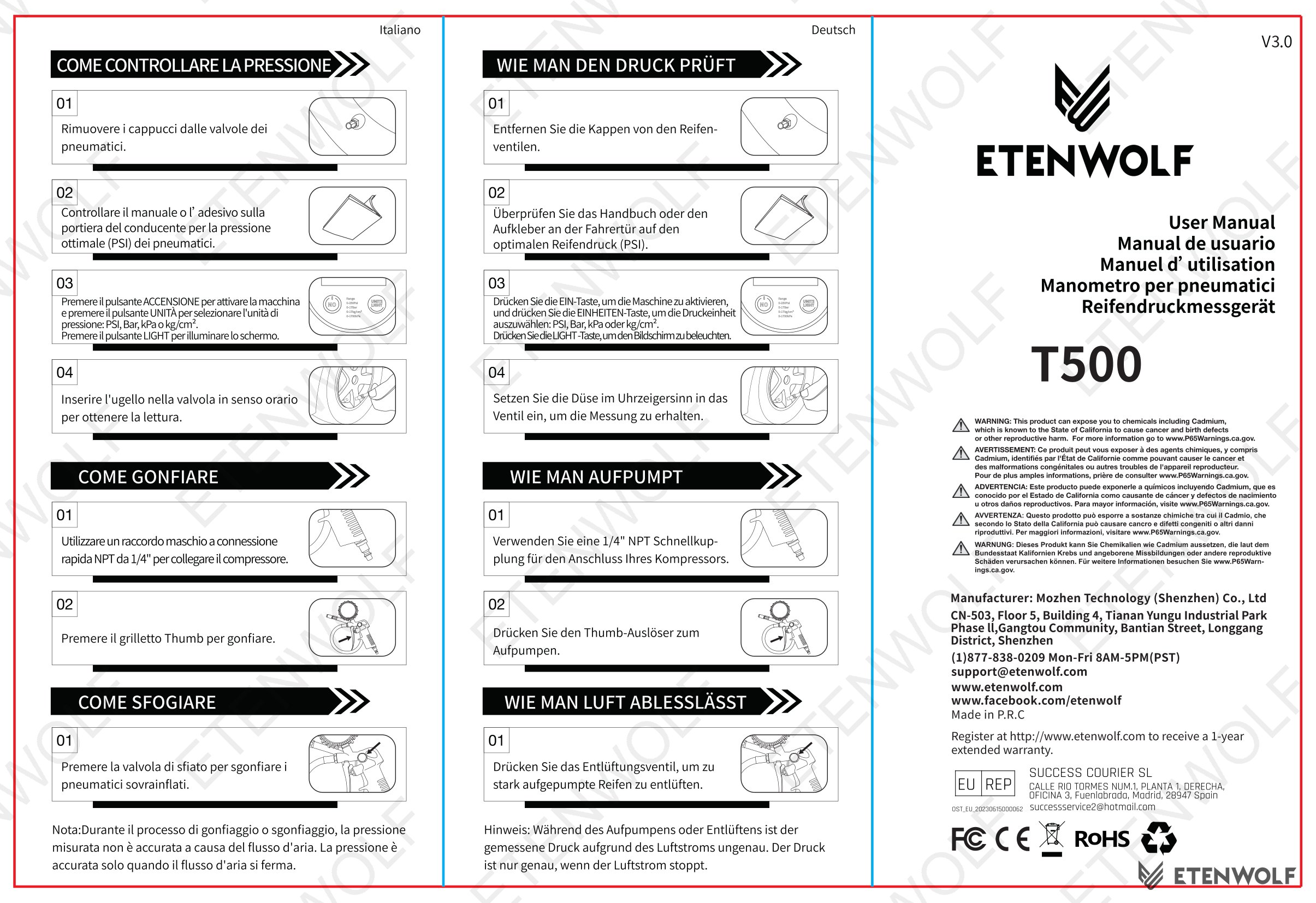
This article is based on the official product user manual for the ETENWOLF T500 tire inflator gauge, issued by ETENWOLF — a global inflation tools and lighting gear brand. The manual covers the complete operating procedure for checking tire pressure, inflating, and deflating tires. It is provided in English, Spanish, and French, confirming the product’s intended global distribution. No certificate number or formal issue date is printed in this document. Users can register at www.etenwolf.com to receive a 1-year extended warranty beyond the standard coverage.
Product Information
The ETENWOLF T500 is a handheld tire inflator gauge designed for consumer and professional use. Key product characteristics documented in the manual include:
- Model: T500
- Brand: ETENWOLF
- Function: Tire pressure measurement, inflation, and deflation
- Supported pressure units: PSI, Bar, kPa, kg/cm²
- Inlet connection: 1/4" NPT Quick-Connect Male Fitting (for compressor attachment)
- Display: Digital screen with dedicated backlight button (LIGHT)
- Controls: ON button, UNITS button, LIGHT button, Thumb trigger (inflate), Bleeder valve (deflate)
The T500 is compatible with standard tire valve stems and is designed for quick, accurate pressure readings once airflow has fully stopped.
Key Details
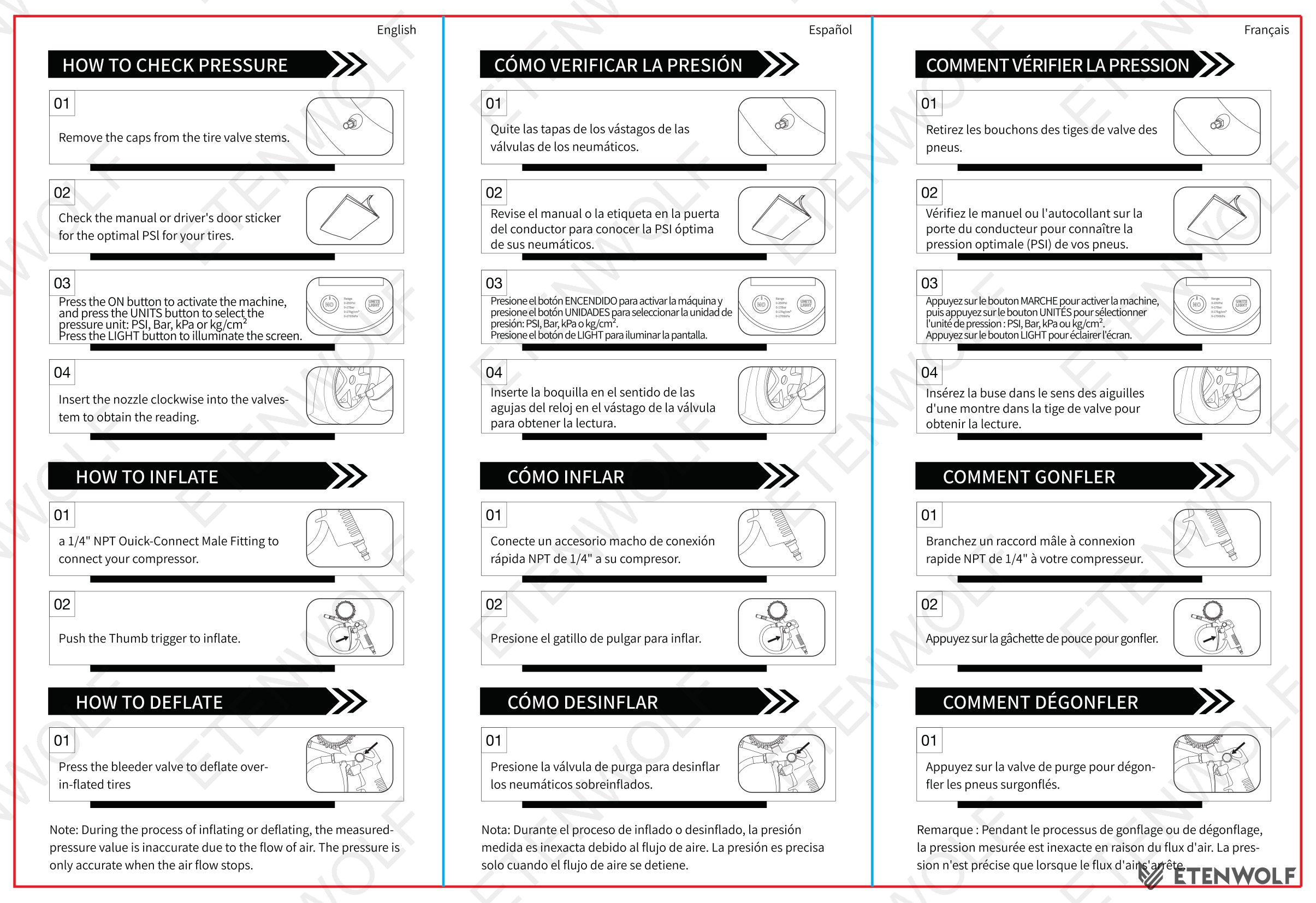
The manual outlines two primary operating procedures: checking tire pressure and inflating or deflating tires. The steps are reproduced below in full from the English-language section of the manual.
How to Check Pressure
- Remove the caps from the tire valve stems.
- Check the vehicle owner’s manual or the driver’s door sticker for the optimal PSI for your tires.
- Press the ON button to activate the machine. Press the UNITS button to select your preferred pressure unit: PSI, Bar, kPa, or kg/cm². Press the LIGHT button to illuminate the screen.
- Insert the nozzle clockwise into the valve stem to obtain the pressure reading.
How to Inflate
- Attach a 1/4" NPT Quick-Connect Male Fitting to connect your compressor to the T500.
- Push the Thumb trigger to inflate the tire.
How to Deflate
- Press the bleeder valve to deflate an over-inflated tire.
| Function | Control | Action |
|---|---|---|
| Power on | ON button | Activates the device |
| Unit selection | UNITS button | Cycles through PSI / Bar / kPa / kg/cm² |
| Screen backlight | LIGHT button | Illuminates the digital display |
| Inflate | Thumb trigger | Opens airflow from compressor to tire |
| Deflate | Bleeder valve | Releases air from over-inflated tire |
| Pressure reading | Nozzle (clockwise) | Seals onto valve stem for measurement |
Important note: During inflation or deflation, the displayed pressure value is inaccurate due to active airflow. The reading is only accurate once airflow has completely stopped.
Standards & Compliance
The T500 user manual does not list specific regulatory certifications or test standards within the extracted text. However, as an inflation tool sold globally by ETENWOLF, the T500 is expected to conform to applicable regional and international standards. The following standards are typically relevant to products of this type:
- IEC standards for electrical safety of portable consumer devices
- ISO standards for pressure measurement accuracy and gauge performance
- CE marking requirements for products distributed in the European Economic Area
- FCC regulations applicable to electronic devices sold in the United States
- RoHS compliance for restriction of hazardous substances in electronic equipment
For confirmed certification details specific to the T500, refer to the product listing at ETENWOLF T500 product page or contact ETENWOLF directly.
Validity & Certification Body
This document is a product user manual, not a third-party test certificate. As such, there is no defined validity period, issuing laboratory, or certification authority associated with this specific document.
- Document type: User Manual
- Issuing party: ETENWOLF (manufacturer)
- Validity period: Not applicable — user manuals do not expire; content is valid for the product lifecycle of the T500
- Extended warranty: A 1-year extended warranty is available upon product registration at www.etenwolf.com
- Standard warranty: Refer to ETENWOLF warranty policy for baseline coverage terms
For third-party certification reports (such as CE, FCC, or RoHS declarations) associated with the T500, contact ETENWOLF or visit the official website.
Frequently Asked Questions
- Q: Why is the pressure reading inaccurate while I am inflating or deflating my tire?
- A: The T500 displays an inaccurate reading during active airflow because pressure is in flux while air is moving. The measurement stabilizes and becomes accurate only after you stop inflating or deflating and the airflow has completely stopped. Always release the trigger and wait a moment before taking your final reading.
- Q: What pressure units does the ETENWOLF T500 support?
- A: The T500 supports four pressure units: PSI (pounds per square inch), Bar, kPa (kilopascals), and kg/cm². You can cycle through these units using the UNITS button after powering on the device.
- Q: How do I connect the T500 to an air compressor?
- A: Use a standard 1/4" NPT Quick-Connect Male Fitting to connect your air compressor to the T500. Once connected, use the Thumb trigger to control airflow into the tire.
- Q: How do I get the 1-year extended warranty for my T500?
- A: Register your product at www.etenwolf.com after purchase to activate the 1-year extended warranty. Registration must be completed through the official ETENWOLF website.
Related Documents
The following document types are relevant to the ETENWOLF T500 and may be sought by procurement teams, retailers, or compliance officers:
- CE Declaration of Conformity — confirms compliance with EU directives for the European market
- FCC ID Certificate — required for electronic devices marketed or sold in the United States
- RoHS Compliance Certificate — verifies restriction of hazardous substances in the product’s electronic components
- REACH Declaration — documents compliance with EU chemical safety regulations
- Product Safety Test Report — third-party laboratory report covering electrical and mechanical safety testing
- Pressure Gauge Accuracy Calibration Report — documents measurement accuracy across supported units (PSI, Bar, kPa, kg/cm²)
- Warranty Policy Document — full terms and conditions for standard and extended warranty coverage
Document Pages